We’ve been quietly building something different from our usual agent infrastructure work. Today we’re releasing Alto as a research preview: an AI-powered photo enhancement tool built for photographers, restorers, and anyone working with images that need more than a basic filter.
Alto upscales, denoises, sharpens, deblurs, colorizes, restores faces, adjusts lighting, and removes backgrounds. But the interesting part isn’t the individual capabilities. It’s how they compose into intelligent processing chains.
Why We Built This
Photo restoration is tedious. A blurry, underexposed black-and-white portrait from the 1960s requires five or six operations in the right order with the right parameters. Colorize first or denoise first? What strength? Upscale before or after face restoration? These decisions compound, and the wrong sequence degrades the final result.
Alto doesn’t replace your judgment. It gives you a starting point. Upload an image, review the suggested processing chain, then decide what to run. If you trust the analysis, the Director executes the chain end to end. If you want control, pick individual tools and adjust the settings yourself.
The goal is to compress the gap between “I have this old photo” and “I have something worth printing.”
Image Analysis
When you upload a photo, Alto runs two parallel analysis passes.
On the client side, a fast heuristic pipeline executes in under 50 milliseconds on a downsampled version of the image. It computes a blur score using Laplacian-based edge detection, estimates noise levels through local patch variance analysis, evaluates brightness distribution across the histogram, and flags whether the image is grayscale. These are lightweight signal extraction operations that run entirely in the browser with no server round-trip.
Simultaneously, a subject detection model runs server-side to produce a segmentation mask of the primary subject. This mask is stored alongside the asset and referenced later for selective editing operations.
Both signals feed into what we call the Director: a rule-based routing engine that maps image characteristics to processing chains. The Director evaluates the combined metrics and selects which workflows to run, in what order, and with what parameters.
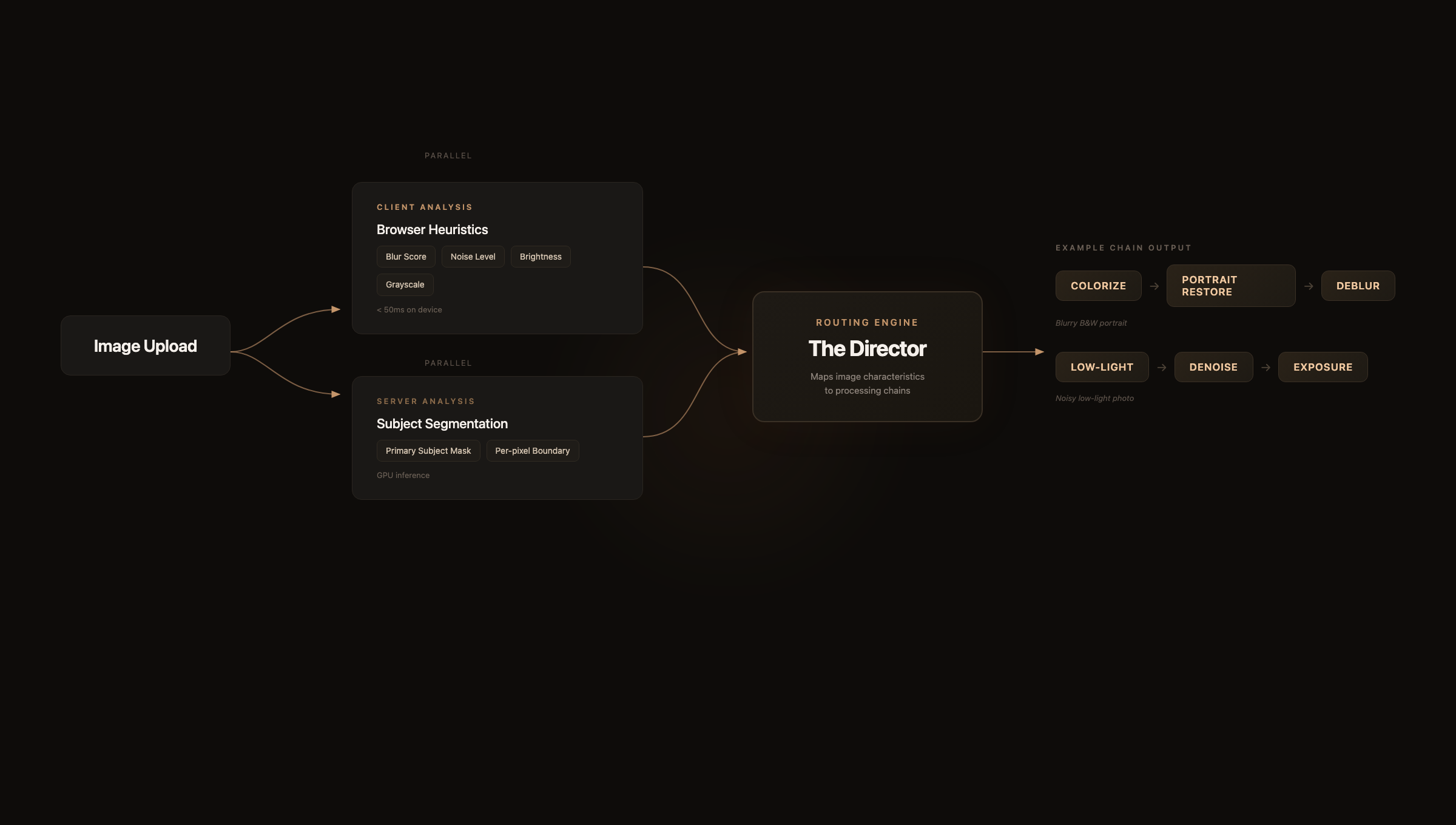
Each step in the chain takes the previous step’s output as input. The Director doesn’t just pick tools. It sequences them so that upstream corrections, like colorization or brightness recovery, give downstream models cleaner input to work with.
The Processing Pipeline
Alto runs over 30 purpose-built inference workflows on dedicated GPU hardware. Each workflow is hand-tuned for a specific task, not a generic pipeline with different parameters.
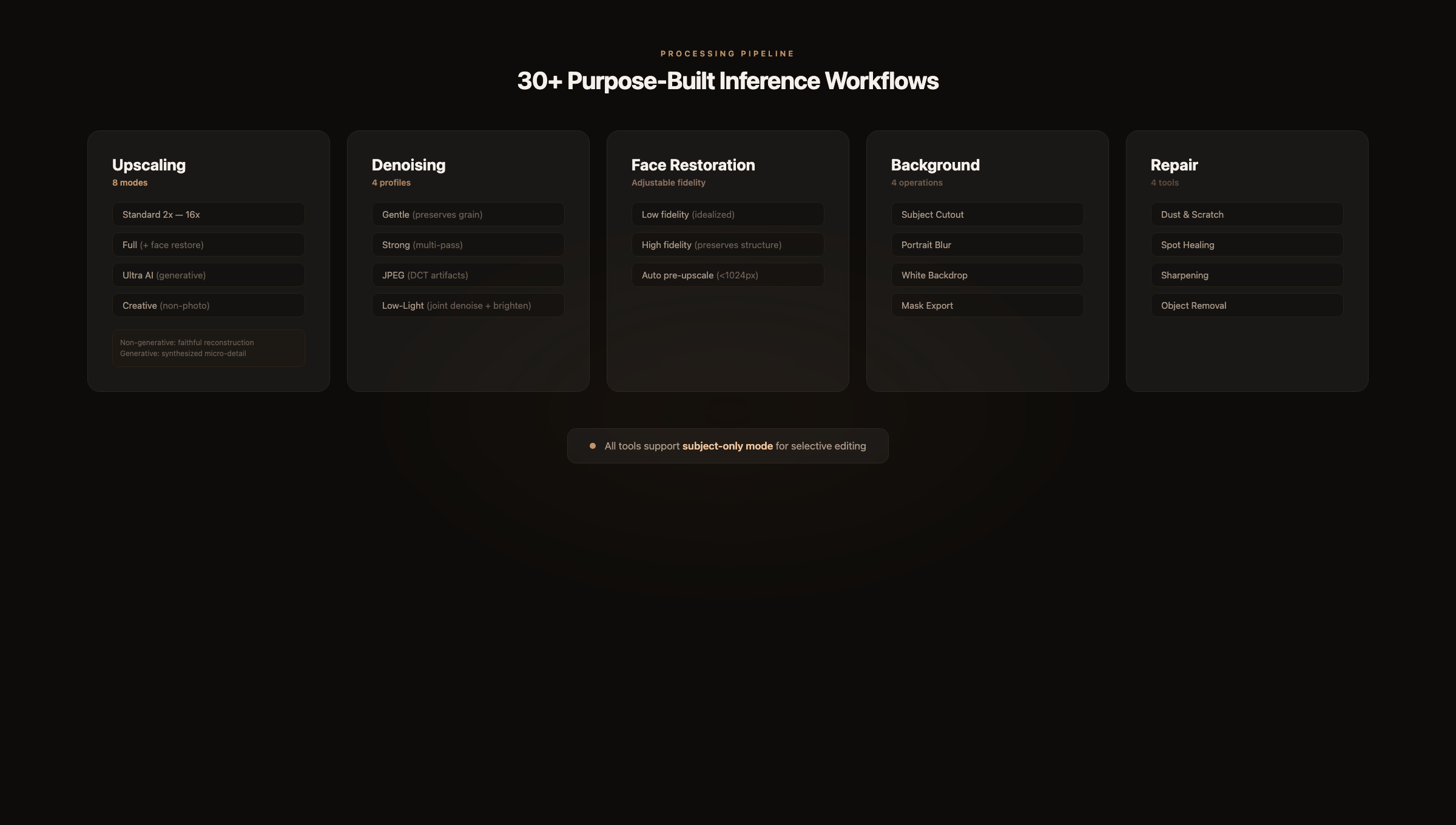
Upscaling offers eight modes. Standard 2x through 16x enlargement uses non-generative super-resolution models that faithfully reconstruct detail without inventing content. Full mode adds face detection and restoration to the upscale pass. Ultra AI switches to a diffusion-based approach that synthesizes plausible micro-detail: skin texture, fabric weave, hair strands. Creative uses a variant tuned for non-photorealistic subjects where synthesized detail looks natural, including wildlife, landscapes, and architecture.
The distinction between non-generative and generative upscaling matters. Non-generative models guarantee that every pixel in the output derives from the input. Generative models produce more visually impressive results but hallucinate detail that wasn’t in the original. Alto separates these clearly so you always know what you’re getting.
Denoising ships with four profiles. Gentle applies conservative filtering that preserves the original character of the grain. Strong runs aggressive multi-pass denoising for heavily degraded images. A dedicated JPEG mode targets DCT block artifacts specifically, which have a fundamentally different frequency signature than sensor noise. Low-light mode jointly denoises and brightens, which matters because noise and underexposure are tightly coupled: increasing brightness on a noisy image amplifies the noise.
Face restoration supports adjustable fidelity. At low fidelity, the model produces a clean, idealized reconstruction. At high fidelity, it preserves the subject’s actual facial structure and imperfections. For portraits smaller than 1024px, Alto applies a pre-upscale pass before restoration to give the face model enough spatial resolution to work with. Without this step, the model can hallucinate facial features that weren’t in the original.
Background operations include subject cutout to transparent PNG, portrait-style background blur with adjustable depth, white backdrop replacement, and raw mask export for use in other tools.
Repair covers dust and scratch removal for scanned prints, spot healing for localized blemishes, text-preserving sharpening for documents, and object removal via inpainting.
Subject-Aware Editing
Multiple tools support a “Subject only” toggle that restricts the operation to the detected subject, leaving the background untouched.
This solves a real problem. Denoising an entire photo often softens backgrounds that were already clean. Sharpening globally amplifies noise in out-of-focus regions. Color boosting a full frame pushes skies and backgrounds into unnatural saturation.
With selective editing, you denoise the person but leave the background crisp. You sharpen the product but preserve the bokeh. You boost color on the subject without touching the environment.
For finer control, click directly on the image to run point-based segmentation and select exactly which region to process, or paint a mask manually with the brush tool. The segmentation model produces per-pixel masks, so boundaries between edited and unedited regions remain clean even on complex edges like hair.
The Editor
The editing canvas supports three comparison modes. Split mode places a draggable vertical divider between the original and the result, with synchronized zoom and pan. Side-by-side renders both in parallel panels. Single mode displays the result full-screen with a hold-to-reveal shortcut for the original.
All modes support smooth zoom up to 32x with pixel-perfect rendering. At 3x and above, interpolation is disabled so you can inspect individual pixels. Pan uses momentum-based scrolling with configurable damping.
Every operation creates a new version in a non-destructive stack. A filmstrip along the bottom of the canvas shows the full edit history for the current image. You can jump to any prior version without losing subsequent work. There is no undo limit. The complete chain is preserved.
Architecture
The frontend is Next.js and React, deployed on Vercel. Convex handles the database, job queue, and blob storage. Authentication runs through our NQL SSO system.
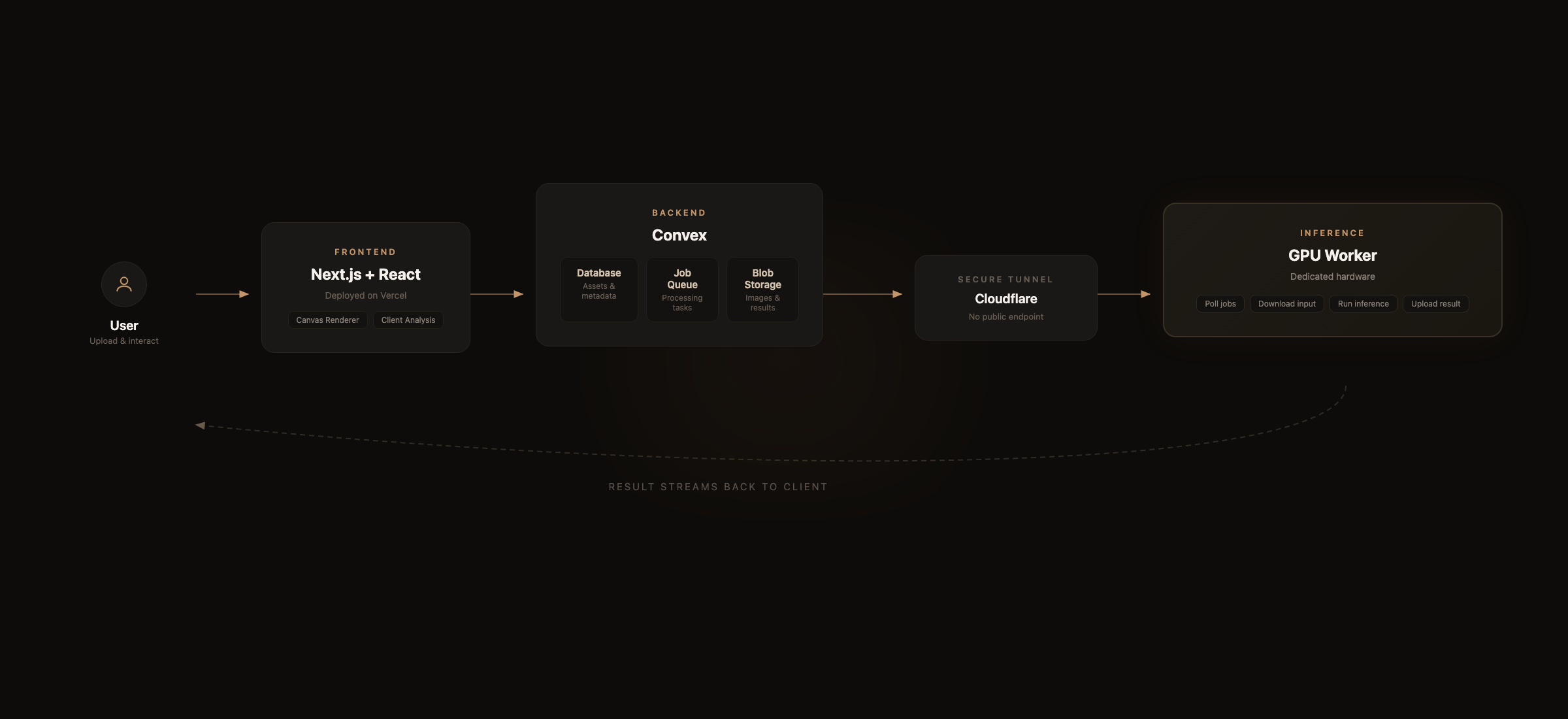
When a job is enqueued, it’s written to Convex as a pending record. A worker process on the GPU machine polls for new jobs, downloads the input image, executes the appropriate inference workflow, and uploads the result back to Convex storage. The GPU is exposed to the internet only through a Cloudflare tunnel, so there is no public-facing inference endpoint to secure.
The canvas renderer uses imperative DOM updates for the split-mode divider and transform state to avoid React re-renders on every frame during zoom and pan. Transform coordinates are stored in refs and synced to React state only on meaningful deltas. This keeps the canvas smooth at 60fps even on large images.
Why a Research Preview
Alto is functional and we use it internally, but we’re calling this a research preview because there is more to build. The Director’s heuristics cover the most common restoration scenarios, but edge cases exist. The workflow library handles standard enhancement and restoration tasks, with gaps remaining in motion blur recovery, advanced inpainting, and batch processing.
We’re also exploring whether the Director should learn from user behavior. Right now it’s purely rule-based. When someone overrides a suggestion or adjusts a parameter, that signal could feed back into better default recommendations over time.
Try It
Alto is live at alto.neuroquestlabs.ai. Upload a photo and see what the Director suggests. Compare the different upscaling modes on the same image.
We’re developing Alto alongside our core SAGE and Lattice work. If you’re working in photo restoration or computational photography, or if you just have old family photos that deserve better, we’d like to hear what you think.
Alto is a research preview from NeuroQuest Labs. It’s free to try during the preview period. If you have feedback or run into issues, let us know.